
The journal that
grades the
decision,
not just the result.
If you want to swing-trade options, TradeShaper gives you the signals that matter — the ones that make your next trade better, without getting in your way. More time trading, less time managing the journal.






The four moves that turn
ideas into discipline.
"Most journals fragment the trade into three disconnected evaluations. TradeShaper threads one set of metrics through all of them — the rule you set pre-trade is the rule the live monitor checks, and the rule the hindsight grader calls out at close."
"Anything: screenshot or text"
Drop in what you already have. TradeShaper turns it into a documented trade and grades it after it closes.
Broker order ticket, TradingView chart, CML Pattern Finder, AI analysis. Drop it into TradeShape. No retyping. No formatting tax. The structure starts filling itself from the moment your screenshot lands.
Broker ticket
Chart panel
CML text
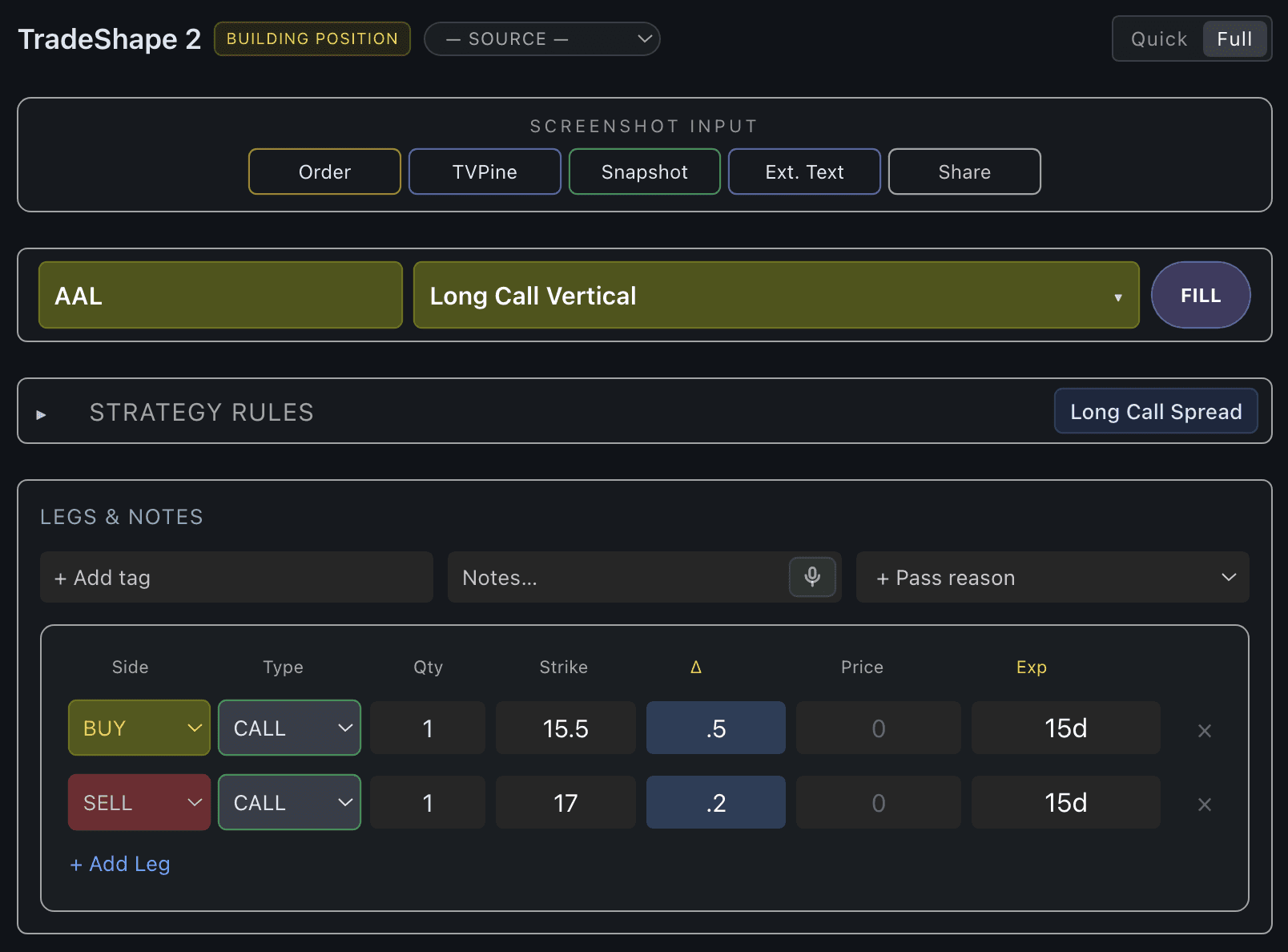
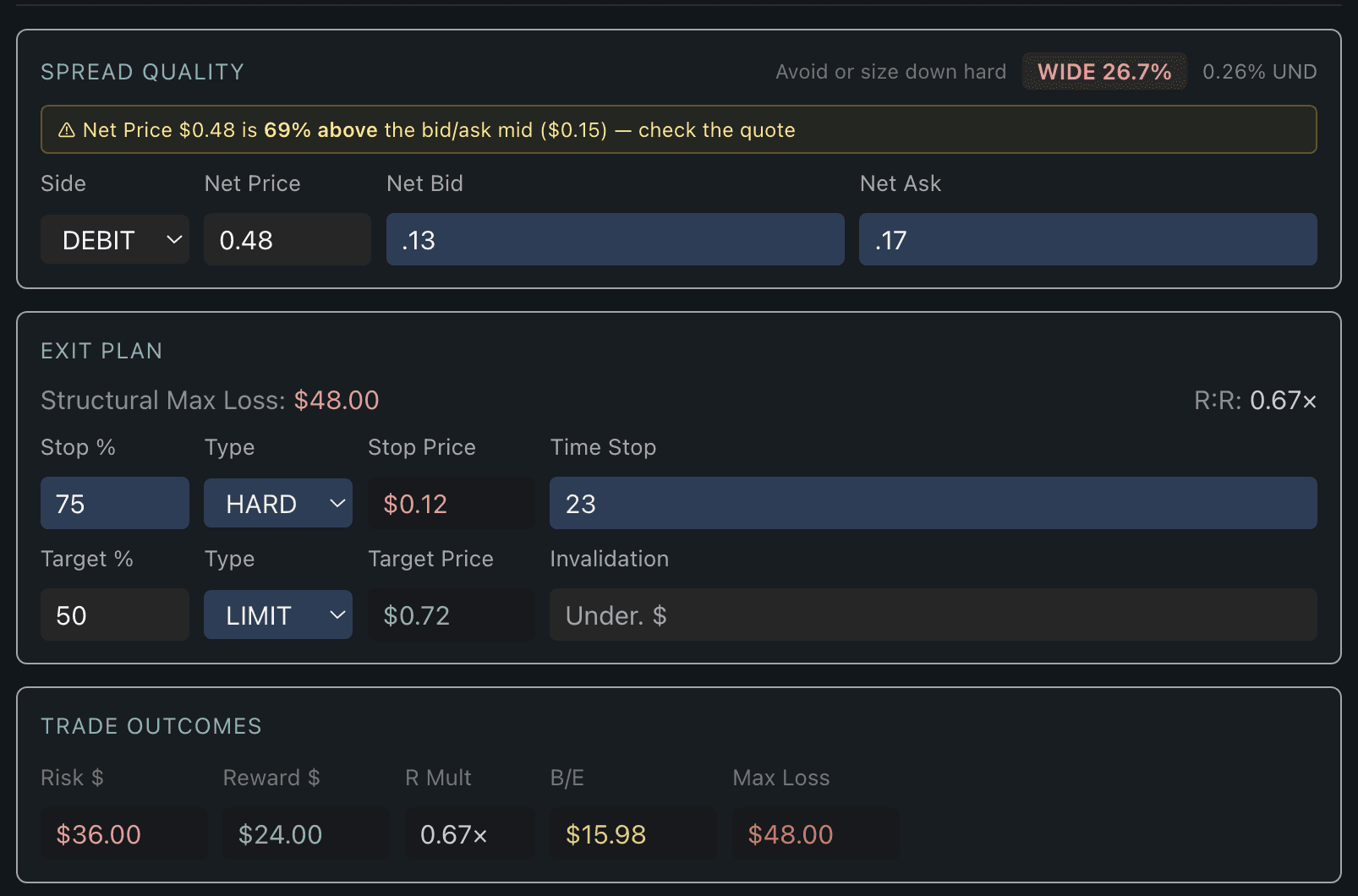
"Auto-filled in seconds"
The platform fills the fields and does the math.
Strikes, deltas, expirations, and live quotes get pulled from the screenshot in seconds. Then TradeShaper grades the spread, computes max loss, R:R, and break-even, and flags trades where the order ticket is paying way over the mid — before you hit send.
Legs filled
Spread graded
R:R computed
"Locked before order"
Shape the idea before you click.
Pick the strategy template. Lock in sizing, stop, target, and invalidation. Add your thesis and your confidence. By the time you click Place Order, the idea is a documented commitment — not a screenshot in a folder.
Strategy rules
Exit plan
Pre-trade thesis


After every close
Find out what you actually did.
When the position closes, TradeShaper compares your actual entry, exit, and management against what the shape called for. You see where you left money on the table, where you got out just in time, and where stop discipline broke — in the same vocabulary you used pre-trade. So the next trade can be the better version of this one.
Exit grading
Money on table
Stop discipline
Know where you stand
Three things your P&L can't tell you.
Where your risk lives. What climate you're in. Whether the edge is yours or the market's.
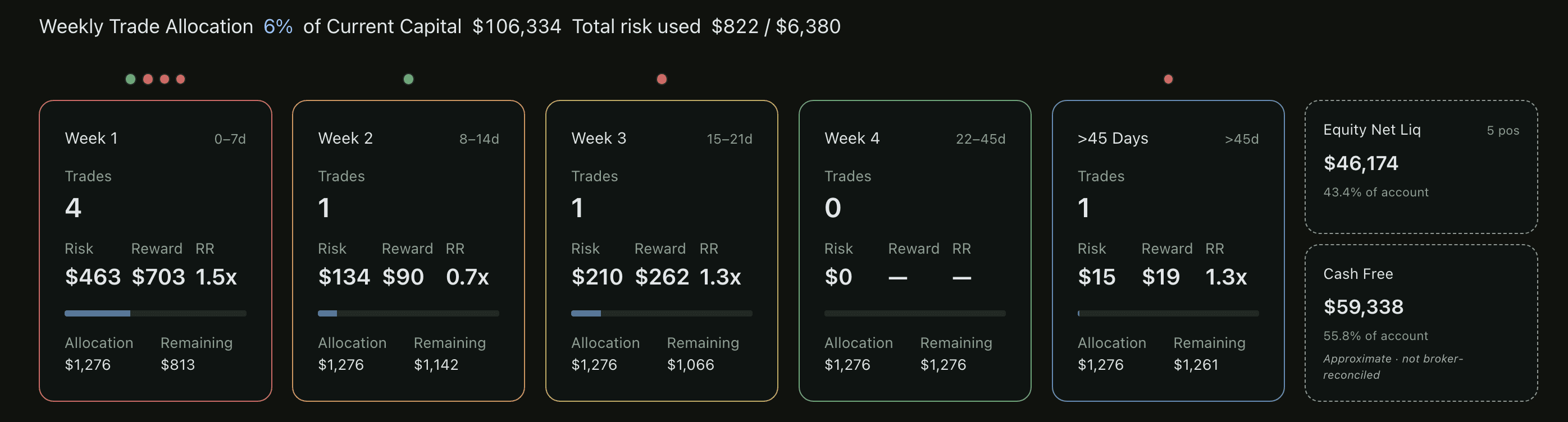
Risk Buckets (Weekly Trade Allocation panel)
Every dollar you put on tracks back to a week, a bucket, a strategy, and an idea. You always know how much is deployed, how much is left, and whether concentration creep, late-week loading, or over-risking is hiding in your portfolio — before it costs you.
By the week
By the bucket
Concentration check
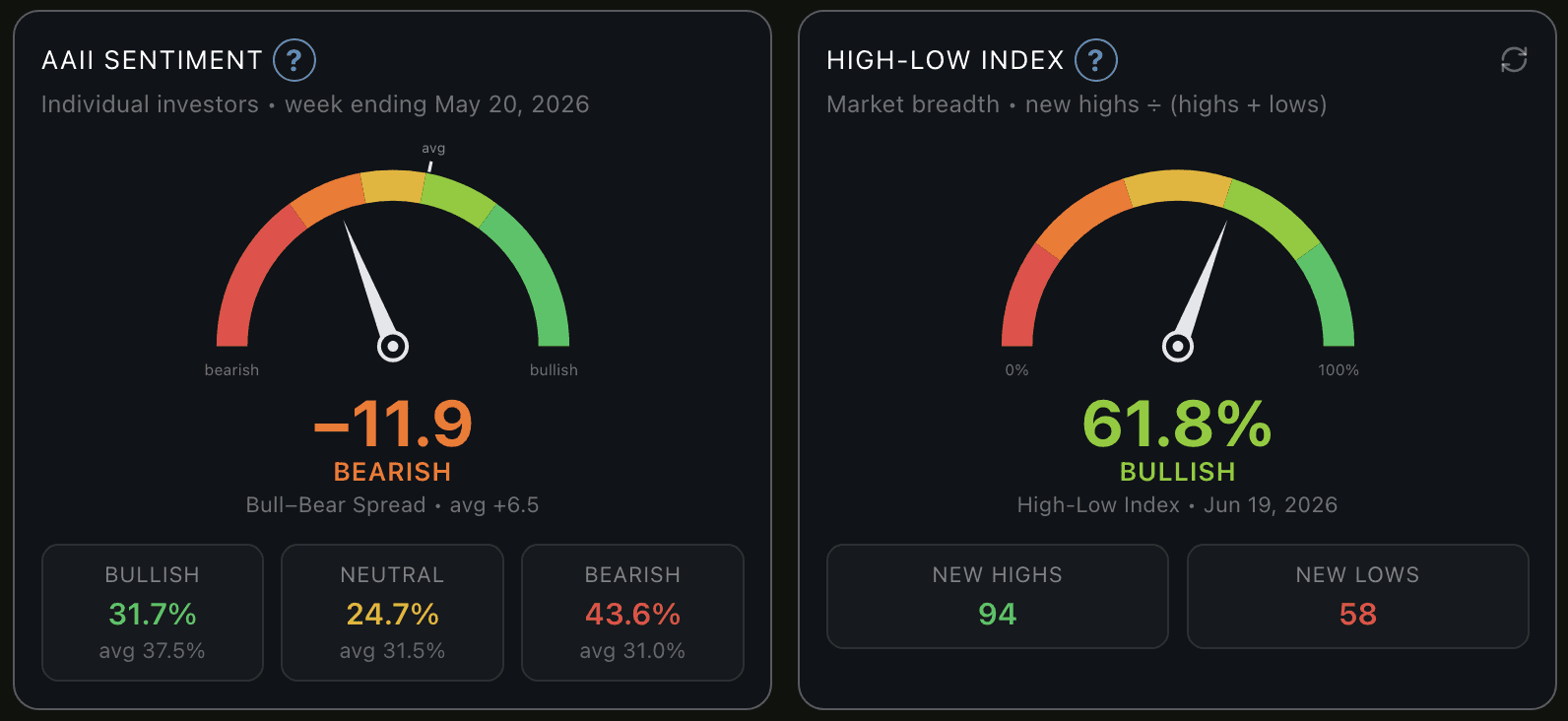
Read the room.
TradeShaper Climate Score, AAII bull-bear sentiment, market breadth, and your own sizing discipline — side by side. Size up when the climate cooperates. Pull back when it doesn't. Stop guessing whether today is a "size up" day.
Climate
Sentiment
Sizing


Is the math yours, or the market's?
Sharpe ratio, Edge Health composite, expectancy per trade, edge by strategy, edge by regime — every angle on whether the edge is real. The number, the trend, and the conditions where the edge actually shows up.
Strategy rules
Exit plan
Pre-trade thesis

"Tools integrated"
Built on the tools you already use.
Surfacing the realities of how you're using them.









Six things most traders never measure.
TradeShaper does all six in the background, every trade.
Discipline you'll want to follow.
Position AI reads every setup against your strategy's gates. When it says "Not Aligned," you don't argue — you see it too. The discipline earns your buy-in, not your resistance.
Hindsight that grades behavior, not luck.
The strategy rules check live during the build. You can't fool yourself into a trade that breaks them, because the platform won't let you pretend.
Passed ideas count too.
TradeShaper logs the trades you skipped. Weeks later it tells you which passes were discipline and which were missed winners.
Find the regime where your edge lives.
Trend, range, high-vol, low-vol — your trades are broken down by market regime so you stop pretending every market looks the same.
You know before you click.
Kelly-fraction sizing tied to backtest stats, bucket allocation by week, and concentration warnings before you trade — not after.
Two screens, one truth.
Build the idea, place the order, then monitor the live position. Same vocabulary, same rules, same grade — pre-trade through post-close.
Pricing
Launch Offer Save 20%.
TradeShaper is ready for your trades. Lock in your seat — only 100 remaining
FAQs
We’ve Got the Answers You’re Looking For
Quick answers to your AI automation questions.
How is TradeShaper different
TradeShaper takes a different approach to journaling. It grades your decisions, not just your results. Each trade gets graded against the plan you committed to before placing it — strategy rules, sizing discipline, exit plan, entry timing. After the trade closes, hindsight grading compares what you actually did against what the trade idea called for, in the same vocabulary you used pre-trade. So the next trade can be a better version of the last one.
Who is TradeShaper built for?
TradeShaper was designed to assist swing Traders, although day trades can be logged, the TradeShaping process would likely lack the details of a fast moving day trader. Options traders who want their journal to do more than log P&L can easily capture the thinking behind the trade. Trade Machine provides direct support to CML TradeMachine and Pattern Finder Members of and will immediately find additional benefits via pre-filled strategies and rules, already hard wired into the platform. TradeShaper is the added tool for traders already using TradingView, Thinkorswim or Tastytrade, and anyone serious about turning each trade into a learning loop.
What brokers and platforms does it work with?
Paste a screenshot of any broker's order ticket — Thinkorswim, tastytrade, or any other options broker — and TradeShaper reads the legs, strikes, deltas, expirations, and net price automatically, with no broker-specific setup. Schwab/Thinkorswim can also connect directly via SnapTrade, and TradingView integrates through our Pine paint-back script.
How is TradeShaper different from a regular trading journal?
TradeShaper is takes a different approach to journaling. It grades your decisions, not just your results. Each trade gets graded against the plan you committed to before placing it — strategy rules, sizing discipline, exit plan, entry timing. After the trade closes, hindsight grading compares what you actually did against what the trade idea called for, in the same vocabulary you used pre-trade. So the next trade can be a better version of the last one.
Do I need CML TradeMachine or TradingView to use it?
No. TradeShaper works fully on its own. CML members get one-paste auto-fill from TradeMachine + Pattern Finder’s excellent charting and Ai commentary. TradingView users have access to the TradeShaper Pine script for one-paste technical extraction. Both accelerate the workflow — neither is required.
Most journals tell you what happened.
TradeShaper tells you why — and whether your process is actually working.